PRIVACY
A personal history should remain personal.
Life Tracker can work with notes, voice, photos, places and Apple Health data. Privacy therefore cannot be only a footer document. It has to be expressed through limits in the interface and implementation.
Explain why a feature needs access, wait for an explicit user action, and only then show the operating-system permission prompt.
What data can appear in Life Tracker
The exact set depends on the features a person chooses. The basic workflow includes an account, tasks, events and entries. Optional access can include microphone and speech recognition, photos, precise location, notifications, Apple Health and iCloud Drive.
Access is not silently enabled. The permission center explains each integration, and opening that center alone does not trigger a system dialog. Location, Health, camera and microphone can remain disconnected while manual core workflows continue to work.
The app explains what the access changes.
No action means no system permission prompt.
The permission can be revoked in device settings.
What is protected on the device
The authentication session is stored through the operating system's secure storage. On iPhone, Keychain is configured for access after the first unlock and for this device only. Legacy session data is migrated out of ordinary preferences and removed from its old location.
Private local values use AES‑256‑GCM encryption. A separate 256-bit key is generated and placed in native secure storage. GCM provides confidentiality and lets the app detect tampering with encrypted values.
This does not mean that everything is always stored only on the phone. Sync and AI features require some server processing. The statement above applies to the protected local values and session implemented in the app; the complete privacy notice describes server-side processing.
How voice becomes useful context
Speech is first turned into text. The transcript becomes part of daily memory. A task or reminder is created only when the person explicitly asks to plan an action—an ordinary thought should not silently change the plan.
To answer, AI can receive allowed context such as preferences, entries, events, tasks, aggregated health information and prior messages. Health data is treated as user-provided context for personal analytics; Life Tracker does not present its AI as a doctor or use it to diagnose.
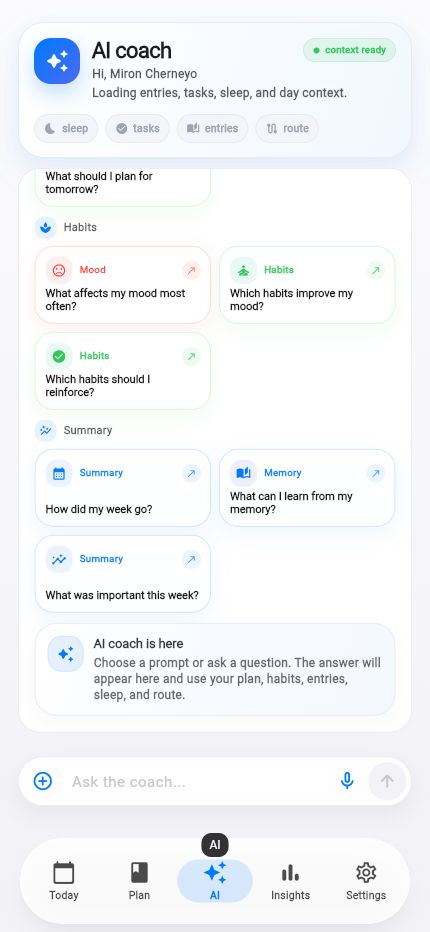 Contextual AIquestions and answers around the day
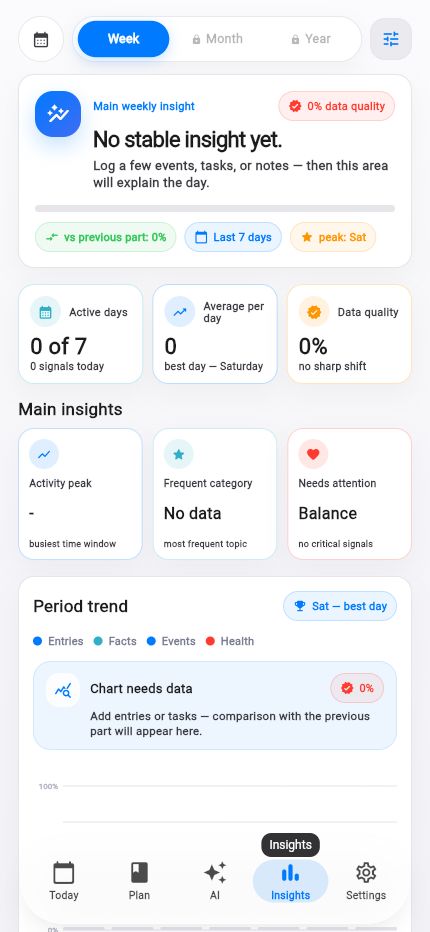 Inspectable insightsdata quality is visible beside the result
Why personal text should stay out of analytics
Product analytics can show whether a screen or workflow works. It should never become a shadow copy of a journal. Event parameters are sanitized before being sent:
- tokens, email, phone, identifiers, questions, messages, content, transcripts, errors and stack traces are replaced with
<redacted>; - strings are capped at 120 characters and collections at 20 items;
- the internal account ID is replaced by an irreversible pseudonymous fingerprint;
- the project's privacy map lists no covered category as used for tracking across other companies' services.
Backups, purchases and deletion
Backups are optional
On iPhone and iPad, a person can separately enable iCloud Drive and manage copies. Unavailable iCloud access is shown clearly.
Card details stay with Apple
Apple processes payment details. Life Tracker receives purchase information needed to unlock a plan.
Deletion is available in-app
Profile settings contain a separate, confirmed and irreversible account-deletion action. App Store subscriptions remain managed through Apple.
Data can be prepared for copying
Settings include a flow that prepares a technical representation of saved settings and data.
Reliability is part of privacy
A lost entry can force someone to re-enter sensitive text. When an AI request fails, Life Tracker preserves the question, clarification and attachments for retry. The timeline can use local cache, while an old network response is prevented from overwriting a newer state. These choices improve usability and reduce unnecessary retransmission.
What the user controls
- Whether to connect microphone, photos, location, Apple Health, notifications and iCloud.
- What context to create: a thought remains memory; an action is planned only after an explicit request.
- When to revoke a system permission or disconnect an integration.
- When to export data or delete the account.
The full legal document covers data categories, processing purposes, retention, user rights and contact details. For a specific scenario, email help@lifetracker.app.
The full privacy notice.
The complete legal text is available on the site in English and Russian.