One task model.
A task is the same on Today, Plan, widgets, and sync. Finish it once.
 Life Tracker
Tasks, habits, and goals live next to the day they belong to — not in a separate system.
Example Sunday night you place a call to the school on Tuesday at 8:10, in the open gap after drop-off.
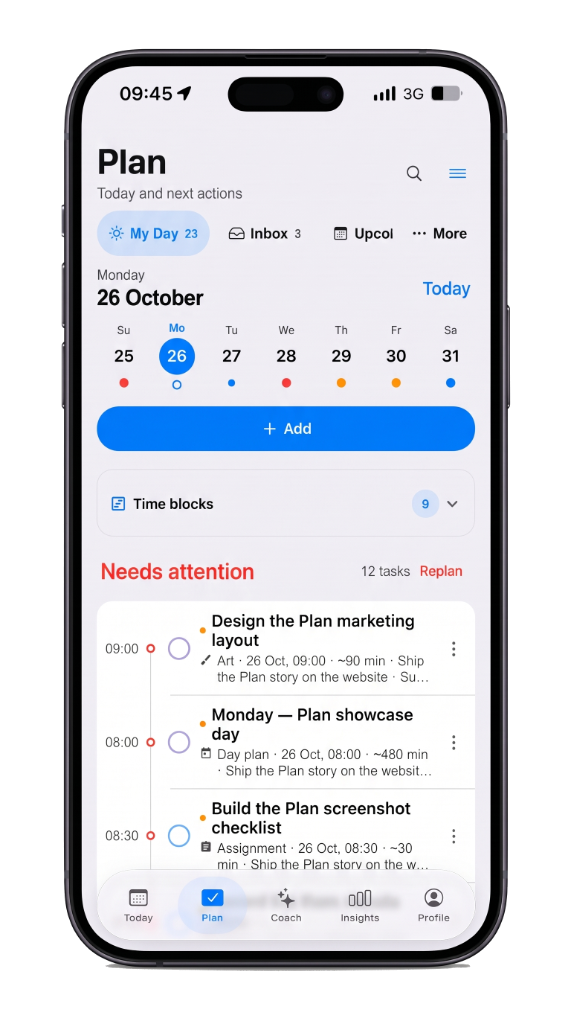
A task is the same on Today, Plan, widgets, and sync. Finish it once.
Habits and goals sit with the work of the day, so consistency is visible.
Two-way calendar sync puts the plan on the calendar you already use.
Most habit trackers live in a separate tab. Life Tracker places habits and goals beside the day timeline so a morning walk, a deep-work block, and a weekly call share one plan. Consistency becomes visible because the repeat sits where the hour actually is.
Sunday night you see Tuesday’s open gap after drop-off and place the school call there. Recurrence and deadlines stay tied to that day — the same task model on Today, Plan, widgets, and calendar sync. Finish it once; it stays finished everywhere.
If you only need a checklist, any to-do app works. If you want daily planning that meets the timeline you already live on — with habits, goals, and two-way calendar sync — Planning is the layer that turns free time into progress without leaving the day.
Life Tracker
Free on iPhone. The same account opens on the web.