Woke up
The day starts on the timeline.
 Life Tracker
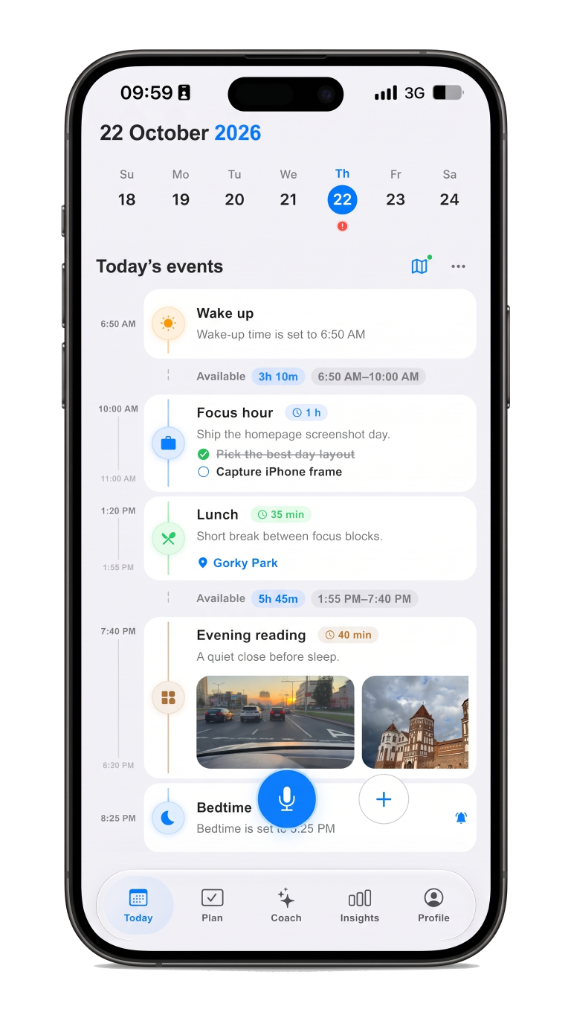
Today
Woke up
The day starts on the timeline.
Buy milk
By voice.
VoiceConfirm
Walk to the station
Stays with the route.
Focus hour
1hSits on the morning plan.
Lunch with Sam
45mAlready on the plan.
Train home
Stays with the route.
Fell asleep
The day closes on the timeline.
Why Life Tracker?
Plans, memory, and routes sit on one day on iPhone and iPad—no switching apps to see what happened.
Voice and Life AI show a card first; nothing is saved until you tap yes.
The same account on iPhone, iPad, and the web keeps one timeline in step.
Gemini runs only after you tap Allow; Apple Health is optional and not medical advice.
Life AI offers previews and suggestions—you choose what lands on the day.
Start free; Plus raises Life AI limits when you want more room.
Voice or a short note.
Listening…
Recognized
Buy milk
Hold to speak
Nothing saves until you confirm.
Nothing saves until you do.
Review
Buy milk
DraftWaiting for your confirm.
VoiceConfirm
Not on the day until Confirm.
It stays on the timeline.
Today
Woke up
The day starts on the timeline.
Buy milk
SavedOn the day now.
Walk to the station
Stays with the route.
Same account. Same timeline.
FAQ
Yes. Start free on iPhone and iPad. Plus raises Life AI limits and keeps insights across years. The same account opens on the web.
The day is a visual timeline, not a pile of lists. Plans, memory, routes, voice, and focus sit on one screen so you see the hour, not just unchecked tasks.
No. Life AI suggests with a preview. Nothing is saved until you confirm. Gemini runs only after you tap Allow in the app.
iPhone and iPad are primary. The same account opens at web.lifetracker.app. Widgets, Live Activity, and Apple Health stay on iPhone.
If you want a day timeline plus voice capture, memory, routes, and calm AI review, yes — that is the Life Tracker wedge. See the guides for honest comparisons.
No ads. The day is a personal timeline. Optional Apple Health is personal analytics, not a medical device. Details are on the Privacy page.
Recent notes
Say it, check it, live it. Voice and Life AI wait for a yes before anything lands on the day.
Home screen widgets and a focus Live Activity keep the next hour visible on iPhone.
Why Life Tracker keeps the day on a single screen instead of splitting plan, memory, and place apart.