Dites-le une fois.
Maintenez pour parler. Life Tracker transforme l’idée en entrée à vérifier, puis à enregistrer.
 Life Tracker
Accueil / Fonctionnalités / Journée
Événements, tâches, notes et voix sur une seule timeline. Glissez un bloc quand l’heure change.
Exemple Le dentiste dépasse 15 h, vous déplacez les courses de 15:15 à 16:30 et la soirée reste cohérente.
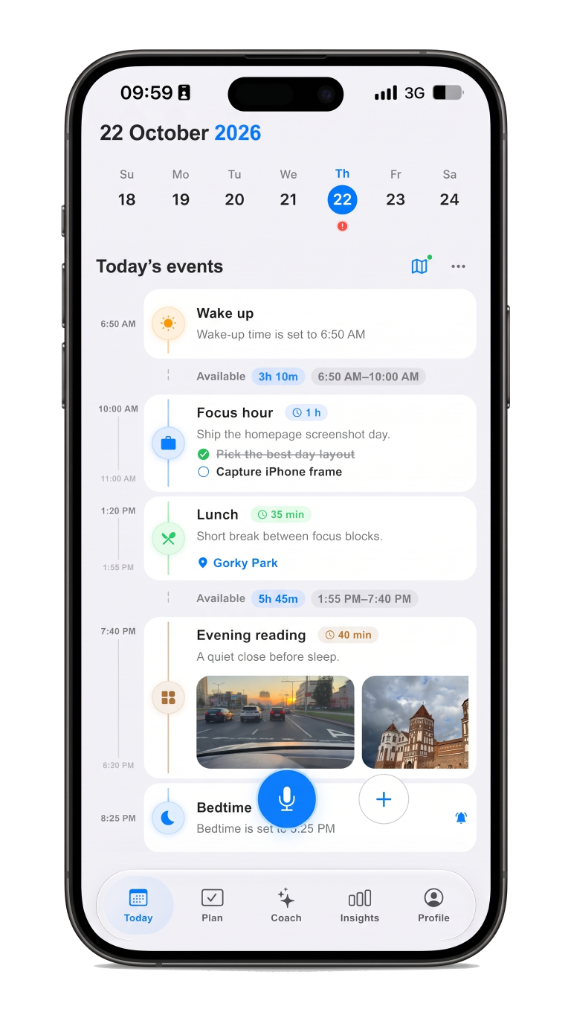
Maintenez pour parler. Life Tracker transforme l’idée en entrée à vérifier, puis à enregistrer.
La journée est une timeline, pas une pile de listes. Déplacez ce qui a changé. Le reste reste en ordre.
Ouvrez la même journée sur iPhone ou dans le navigateur. Rien à copier entre les apps.
A checklist hides time. A day timeline planner shows the hour: what is next, what already happened, and where open gaps still sit. Life Tracker keeps plans, voice notes, routes, and focus on that same screen so you plan the day you actually live — not a separate system you abandon by noon.
Drag blocks when the schedule slips. Capture by voice on the walk to the car. Open the same day on iPhone or the web without copying between apps. The timeline is the product: one scroll for the morning plan, the afternoon shift, and the note you meant to keep.
People who tried habit trackers and task lists and still felt scattered. If you want a visual daily planner with voice and calm AI review — not another inbox — start on the day timeline, then deepen with planning and Life AI when you need them.
Life Tracker
Gratuit sur iPhone. Le même compte s’ouvre sur le web.