Einmal sagen.
Gedrückt halten zum Sprechen. Life Tracker macht aus dem Gedanken einen Eintrag zum Prüfen und Speichern.
 Life Tracker
Start / Funktionen / Tag
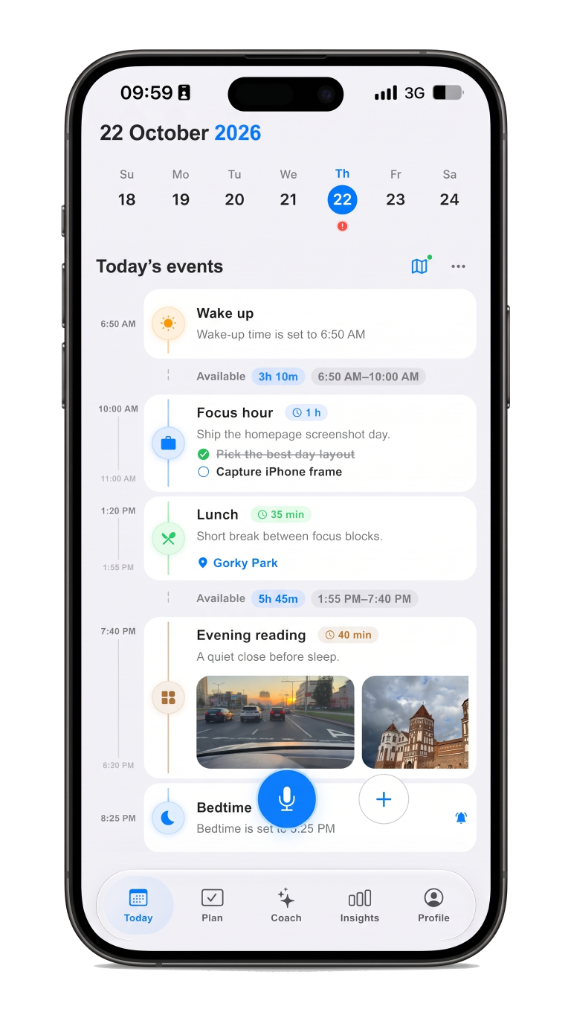
Termine, Aufgaben, Notizen und Sprache auf einer Timeline. Ziehen Sie einen Block, wenn sich die Stunde ändert.
Beispiel Der Zahnarzt dauert länger als 15 Uhr — Sie verschieben den Einkauf von 15:15 auf 16:30, und der Abend bleibt geordnet.
Gedrückt halten zum Sprechen. Life Tracker macht aus dem Gedanken einen Eintrag zum Prüfen und Speichern.
Der Tag ist eine Timeline, kein Stapel Listen. Verschieben Sie, was sich geändert hat. Der Rest bleibt sortiert.
Denselben Tag auf iPhone oder im Browser öffnen. Nichts zwischen Apps kopieren.
A checklist hides time. A day timeline planner shows the hour: what is next, what already happened, and where open gaps still sit. Life Tracker keeps plans, voice notes, routes, and focus on that same screen so you plan the day you actually live — not a separate system you abandon by noon.
Drag blocks when the schedule slips. Capture by voice on the walk to the car. Open the same day on iPhone or the web without copying between apps. The timeline is the product: one scroll for the morning plan, the afternoon shift, and the note you meant to keep.
People who tried habit trackers and task lists and still felt scattered. If you want a visual daily planner with voice and calm AI review — not another inbox — start on the day timeline, then deepen with planning and Life AI when you need them.
Life Tracker
Kostenlos auf dem iPhone. Derselbe Account öffnet sich im Web.