说一次就够。
按住说话。Life Tracker 把想法变成可核对再保存的条目。
 Life Tracker
事件、任务、笔记与语音在同一条时间线上。时间变了就拖动区块。
示例 看牙拖到三点以后,你把买菜从 15:15 拖到 16:30,晚上仍井井有条。
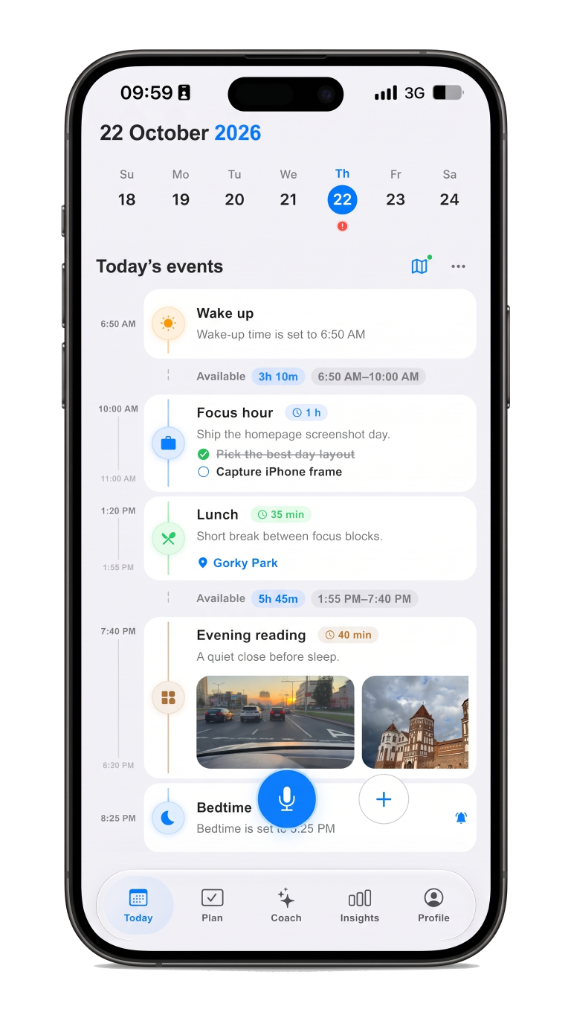
按住说话。Life Tracker 把想法变成可核对再保存的条目。
一天是时间线,不是一堆列表。挪动变化的,其余保持顺序。
在 iPhone 或浏览器打开同一天。不必在应用间复制。
A checklist hides time. A day timeline planner shows the hour: what is next, what already happened, and where open gaps still sit. Life Tracker keeps plans, voice notes, routes, and focus on that same screen so you plan the day you actually live — not a separate system you abandon by noon.
Drag blocks when the schedule slips. Capture by voice on the walk to the car. Open the same day on iPhone or the web without copying between apps. The timeline is the product: one scroll for the morning plan, the afternoon shift, and the note you meant to keep.
People who tried habit trackers and task lists and still felt scattered. If you want a visual daily planner with voice and calm AI review — not another inbox — start on the day timeline, then deepen with planning and Life AI when you need them.
Life Tracker
iPhone 免费使用。同一账号可在网页打开。