It already saw the day.
Ask about the schedule, not a blank chat. The answer starts from your timeline.
 Life Tracker
Life AI reads the context you already captured. You review every suggestion before it lands.
Example You ask what can move if the 4:00 call runs long, read the suggested shift, and confirm before anything is saved.
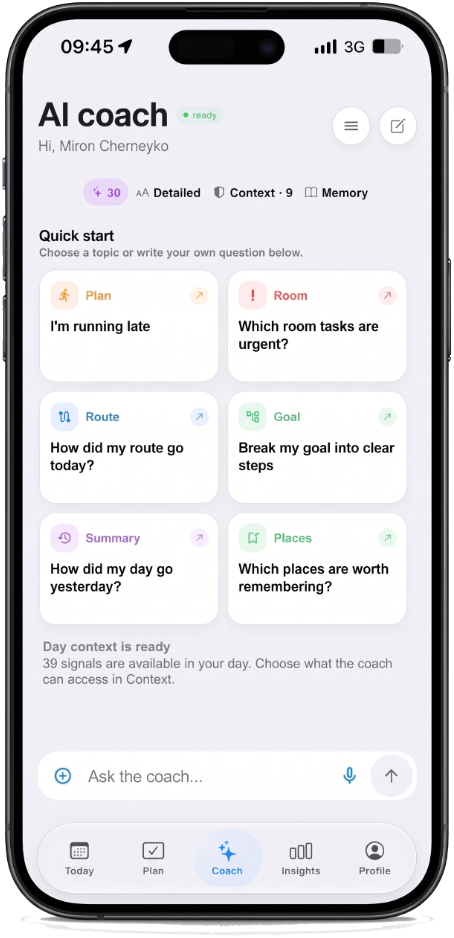
Ask about the schedule, not a blank chat. The answer starts from your timeline.
Action previews show what will change. You confirm. Then it is part of the day.
Free includes a daily allowance. Plus raises coach, parse, and shared-room limits.
Blank chatbots invent a schedule you never kept. Life AI starts from the day you already captured — events, tasks, notes, and open gaps — so answers about “what can move” refer to real hours. That is the difference between a generic AI planner and a coach that knows the day.
Every suggestion shows as a preview. You read the shift, tap yes, and only then it becomes part of the timeline. Gemini runs only after you allow it in the app. Free includes a daily allowance; Plus raises coach and parse limits when you need more room.
If other AI planners rewrite your calendar without asking, Life Tracker is the opposite: review first, save second. Use it when a meeting runs long, when you need a replan, or when you want a second look at the afternoon — without surrendering control of the day.
Life Tracker
Free on iPhone. The same account opens on the web.